01
Detect what kind of PDF it is
On upload, BluTranslate reads the page count and checks whether the pages carry a text layer or are images of text. You see the page count and the settings before you confirm; nothing is charged until you do.
Translate PDF documents with the same format. Get your PDF documents translated in minutes, not weeks. Bluente combines the best of machine translation with Bluente’s proprietary content layer and AI to deliver contextual relevance and accuracy to your PDFs.
Trusted by leading teams worldwide

Our AI understands the nuances of different industries, ensuring that your specialized terminology and context are translated accurately every time. From financial documents to legal contracts, technical manuals to medical reports - Blu Translate delivers precision that matters to your business.
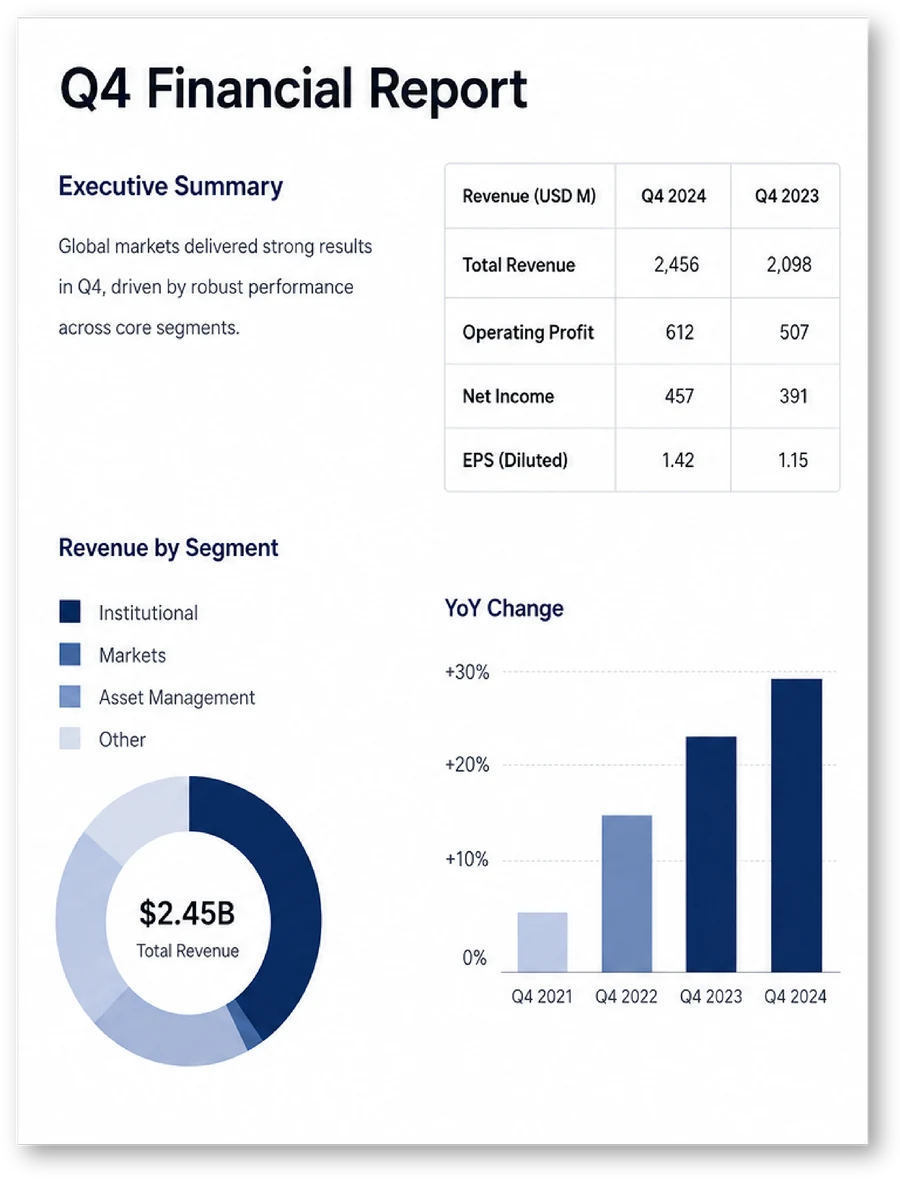
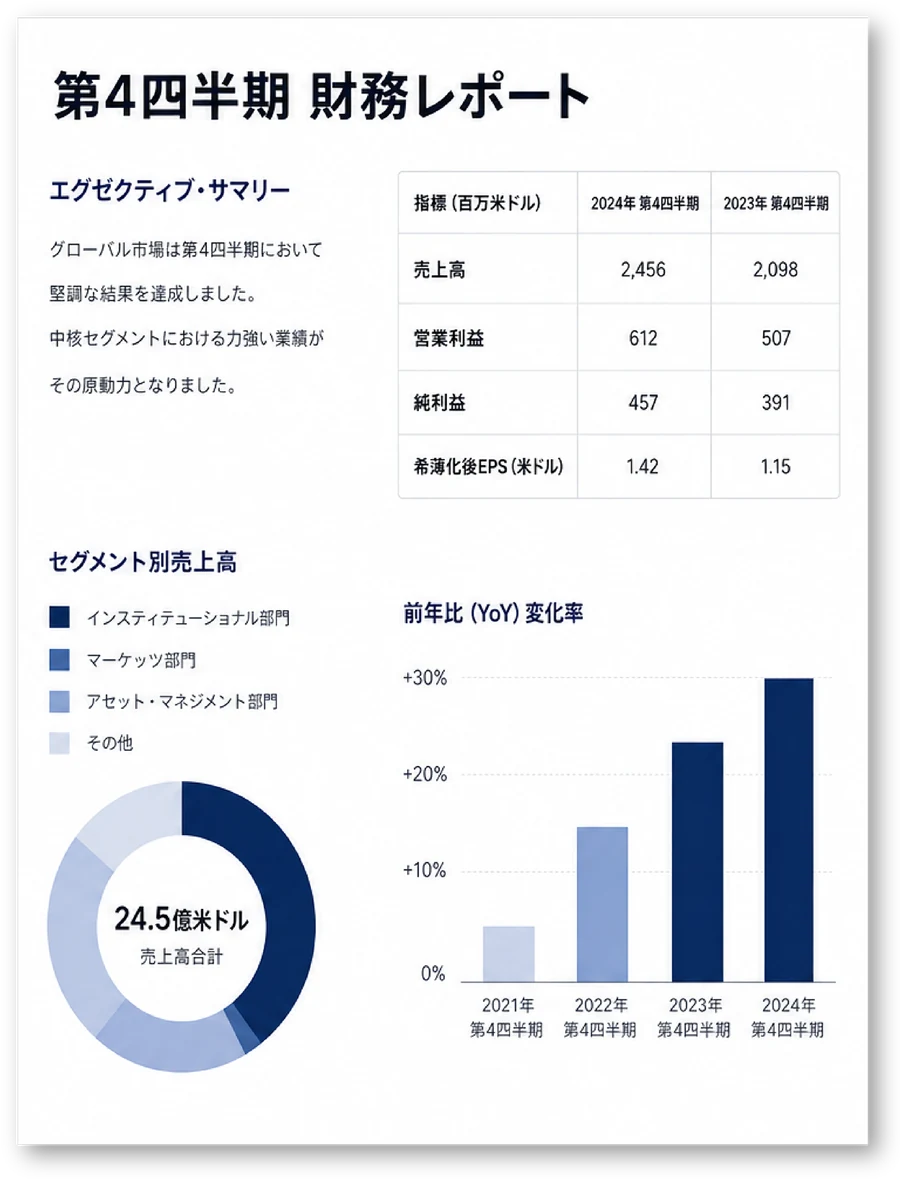
Translate your PDF files without losing your formatting. Pictures, charts, tables, legal numbering - everything stays exactly where it should be. Blu Translate keeps everything intact, ensuring that you get accurate translations while maintaining the original visual structure and professional appearance.
A PDF is a page description, not a document: the text sits in positioned fragments, and a scanned PDF has no text at all. BluTranslate recovers the document first, which is why the result keeps its layout.
01
On upload, BluTranslate reads the page count and checks whether the pages carry a text layer or are images of text. You see the page count and the settings before you confirm; nothing is charged until you do.
02
Text-based PDFs are parsed into an editable layout. Scanned pages go through OCR, which captures reading order and block geometry, where each heading, paragraph and table sits, before any translation starts.
03
The engine works on the recovered text with your glossary applied as a constraint: defined terms, entity names and do-not-translate items come out the same on every page and in every file of the set.
04
The translated text is placed back over the original layout, so tables, numbering, headers, footers and images keep their positions. Download it as PDF, Word or PowerPoint, or as a bilingual file with the original alongside.
| Element of the PDF | What BluTranslate does with it |
|---|---|
| Tables and financial statements | Rebuilt as tables, with rows and columns in place, so a translated statement can still be read line by line against the source. |
| Headers, footers, footnotes and page numbers | Kept in position on every page. |
| Numbered clauses, cross-references and lists | Clause numbering and cross-references stay part of the document instead of being flattened into prose. |
| Images, charts and diagrams | Left in place. Text inside a graphic is not touched in standard mode; image mode re-renders the graphic in the target language and is charged at 5 credits a page instead of 1. |
| Fonts and styling | Brand fonts and styling remain part of the document. |
| Scanned pages | Two OCR modes. Text mode returns a clean, text-only document built from the recognised text. Overlay mode places the translation back over the original scan, so stamps, seals and letterheads stay visible. The returned PDF carries a searchable text layer. |
| Pages you do not need | Choose a page range such as 1-3,5 and only those pages are translated and charged. |
| Bilingual review copy | Original and translation side by side, or the translation directly under the original, for checking against the source in one document. |
Upload, choose the languages, download. Most PDFs come back in about two minutes, scanned files included.
Step 1
Drag and drop a PDF of up to 100 MB. Scanned files work too.
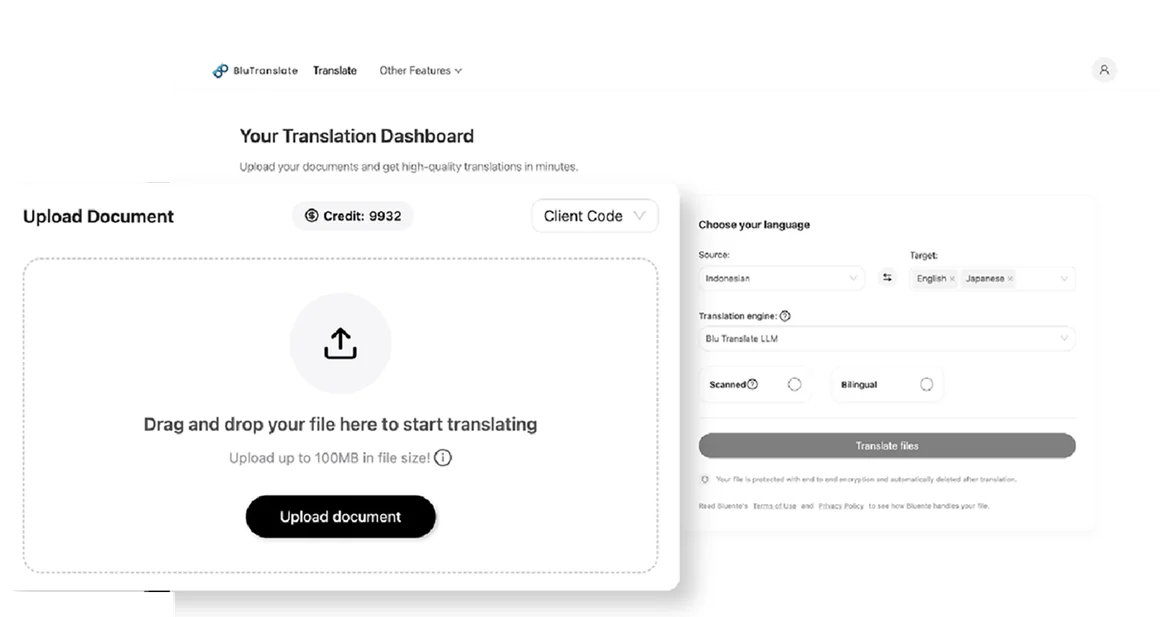
Step 2
Pick a source language and one or more targets, then choose your translation engine.
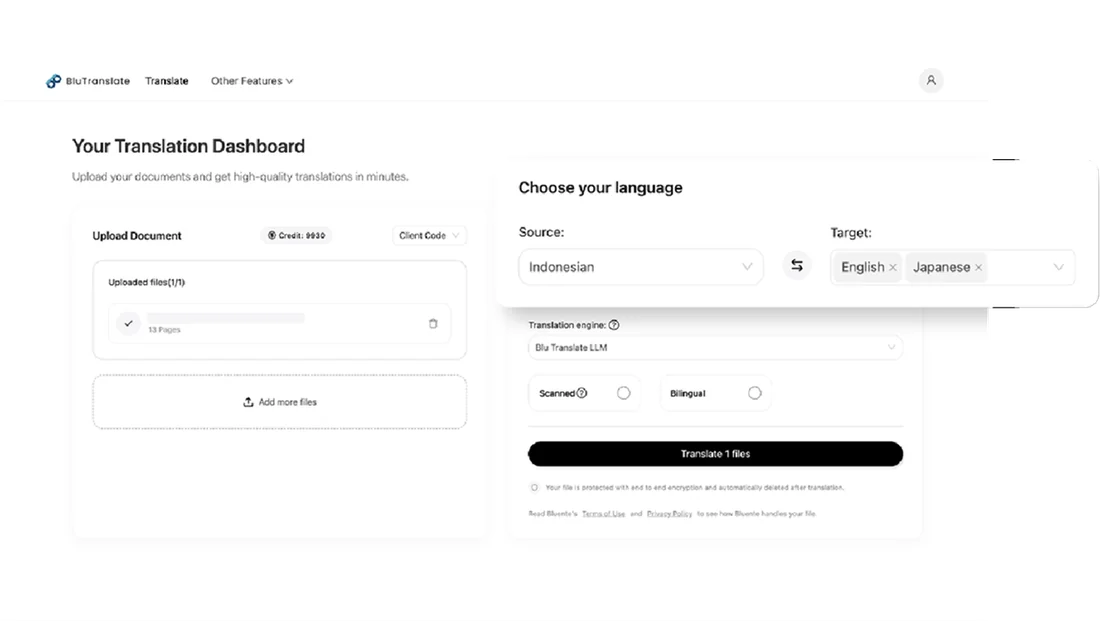
Step 3
Translate your file and download it with tables, charts and numbering where they were.
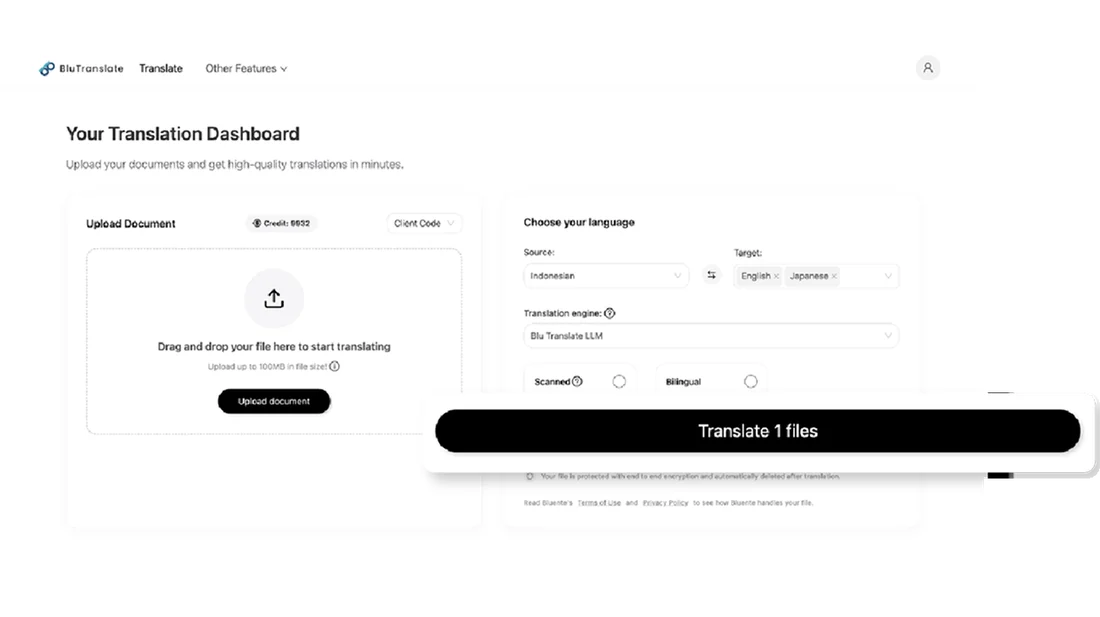
Text-based and scanned PDFs go through the same workflow, up to 100 MB per file, and come back in the format the next reviewer needs.
PDFs exported from Word, PowerPoint, InDesign or a browser, with a selectable text layer.
Image-only PDFs from a scanner or a phone camera. Choose text mode or overlay mode; printed text scanned at 300 dpi gives the cleanest result.
Reports, statements and decks saved as PDF. Visual elements stay in place, and tables come back as tables.
Up to 100 MB per file, the same limit for scanned and native PDFs. Translate a page range if you only need part of a long file.
Original and translation side by side, or the translation under each original block, for review against the source.
Download the same finished translation as PDF, Word or PowerPoint. The conversion happens at download time and does not use extra credits.
At scale the failure is never one bad word. It is the same word rendered two ways across a document set assembled by four people over three weeks. Your glossary applies as a constraint on the engine, not a suggestion to it, so page 1 and page 400 agree, and so do twelve PDFs from the same matter.
| What you lock | Result in the translated PDF |
|---|---|
| Defined terms such as “Agreement” or “Net Asset Value” | Your approved rendering every time it appears, in every file in the workspace |
| Company names, product names, tickers, acronyms | Left untranslated |
| Regional variants, such as Traditional Chinese for Taiwan | Each language pair keeps its own entry |
| Currency and unit symbols, statute and case citations | Kept in the form your reviewers expect, on every page |
One list, applied on every occurrence: reviewers check meaning, not terminology.
120+ languages and regional variants, including Arabic, Simplified and Traditional Chinese, Japanese and Korean, with the layout preserved.
+ more language pairs supported
View all languagesContracts, statements and evidence files are the PDFs people most need translated. BluTranslate protects every file and gives your security team the evidence it asks for.
Files are encrypted in transit and protected with AES-256 encryption at rest, and the processing region can be pinned to one you choose from those available.
Uploaded and generated files are deleted automatically within 24 hours. Stricter retention controls are available for enterprise deployments, including single-tenant, your own cloud and on-premise.
Your PDFs, your corrections and your glossary content are not used to train Bluente’s models or any third-party shared model.
Every PDF translated on BluTranslate is processed under Bluente’s ISO/IEC 27001 information-security management system and covered by its SOC 2 Type I report, which assesses the design of controls for security, availability and confidentiality. For documents subject to the GDPR, Bluente provides GDPR-ready contracting: a Data Processing Agreement, EU Standard Contractual Clauses and a documented sub-processor chain for cross-border processing review.
Free tools translate the words in a PDF. The difference is what comes back.
| Free online translators | BluTranslate | |
|---|---|---|
| What comes back | Translated text, often as one long stream; tables, columns and captions have to be rebuilt by hand | A translated PDF with tables, numbering, headers, footers and images where they were |
| Scanned pages and text in images | Usually skipped, or returned untranslated | OCR built in, in text or overlay mode; the returned PDF is searchable |
| File size and length | Tight caps on file size and page count; long files have to be split and reassembled | Up to 100 MB per file; translate a page range if you only need part of a file |
| Terminology | Whatever the engine picks, page by page | Glossary applied as a constraint on every occurrence, in every PDF in the set |
| Review | Original and translation in two different windows | Bilingual output, side by side or stacked, plus PDF, Word or PowerPoint downloads |
| Confidentiality | Depends on the tool and its terms | Deleted within 24 hours, never used for training, ISO/IEC 27001 and SOC 2 Type I |
A 30-page PDF report that takes an agency a week comes back from BluTranslate in about two minutes, at under $0.60 a page instead of $38 to $75, in any of 120+ languages, with the layout intact. Your team reviews a finished draft instead of rebuilding one.
| Metric | Agency or manual route | BluTranslate draft, reviewed by your team |
|---|---|---|
| Time to translate a 30-page PDF (about 7,500 words) | 5 to 8 working days of translation alone, at 1,000 to 1,500 words a day for legal or technical text, plus the time to rebuild the layout afterwards | About 2 minutes on average per document |
| Cost per page (250 words) | $38 to $75 at typical professional rates of $0.15 to $0.30 per word | Under $0.60 per page; 5 free pages to start, no credit card |
| Cost of the same 30-page PDF, one language | $1,125 to $2,250 | Under $18 |
| Scanned PDFs | Retyped, or run through a separate OCR tool, before translation can start | OCR built in, in text or overlay mode, at the same 1 credit per page as a text PDF |
| Formatting | Layout rebuilt after translation, usually by converting the PDF to Word and back | Translation placed back over the original layout; PDF, Word or PowerPoint output; bilingual side by side or stacked |
| Terminology | Style guide plus manual QA, linguist by linguist | Glossary applied on every occurrence, in every PDF in the set |
Around 90% of the time of an agency workflow, from upload to reviewed draft
Around 70% of the cost of an agency workflow at list price, before volume pricing
Per document, in any of 120+ languages, with formatting preserved
“A Must-Have tool for legal professionals. It saves valuable time with precise translations & maintains formatting!”
“Since we started using Blu Translate, I’ve seen significant boost in our productivity!”
Yes. Scanned PDFs go through OCR first, and you choose between two modes. Text mode returns a clean, text-only document built from the recognised text. Overlay mode places the translation back over the original scan, so stamps, seals and letterheads stay visible. The returned PDF carries a searchable text layer. Printed text scanned at 300 dpi gives the cleanest result; handwriting is the most error-prone case and should always be checked by a person.
100 MB per file, on every plan, and scanned PDFs are not capped lower than native ones. The page count is shown before you confirm, and you can translate a page range such as 1-3,5 so that only those pages are translated and charged.
Yes. The translation is placed back over the original layout, so tables, headers, footers, footnotes, numbering, cross-references and images stay where they were, and brand fonts remain part of the document. Text inside images is left as it is in standard mode; image mode re-renders the graphic in the target language at 5 credits a page.
PDF by default. The same finished translation can also be downloaded as a Word or PowerPoint file, and as a bilingual document with the original alongside, either side by side or stacked. Format conversions happen at download time and do not use extra credits.
Up to 95% on legal language, measured against a customer’s own reference set rather than a public benchmark. A glossary closes most of the rest, and the bilingual output makes the review step fast. Anything filed, signed or published should keep a human review.
About two minutes per document on average, and most PDFs come back within minutes even for large files. Scanned PDFs take a little longer because OCR runs before translation.
You get 5 free pages when you sign up, with no credit card required. After that, the Starter pack is $12 one-time and the Professional plan is $20 per user per month, at under $0.60 per page; Business plans are typically 40% less per page. Standard and scanned modes cost 1 credit per page; image mode costs 5.
120+ languages and regional variants, including Arabic, Simplified and Traditional Chinese, Japanese, Korean, Hindi, Vietnamese and Thai, and variants such as Brazilian Portuguese, Canadian French and Latin American Spanish.
Yes. Terms are enforced on text recovered by OCR exactly as on native files, and on PDFs sent through the API. Lists are scoped per workspace and have no cap on entries on any plan.
Yes. Files are encrypted in transit and at rest with AES-256, deleted within 24 hours, and never used to train models. Bluente holds ISO/IEC 27001 certification and a SOC 2 Type I report, and the processing region can be pinned.
Yes. Batch processing lets you upload several documents and translate them together, and one upload can produce several target languages.
Yes. Download the translation as a Word file to edit it, or use the bilingual layout to check it against the source page by page. Corrections you make are not used to train shared models.